
Every race director’s worst call is “we can’t find a team”
Adventure races cover large, remote areas. The best protection you have is knowing the last place each team was seen, and when. Checkpoint puts that information in front of race HQ while the race is happening, instead of after the fact.
Know the last known location of every team
Volunteers check teams in and out of each Transition Area (TA) from the app. Every action is timestamped and sorted into clear sections: Checked in, Teams coming, Checked out, and DNS / DNF. A volunteer can find any team in seconds by searching a bib number or team name.
Timestamped check-in and check-out
Every arrival and departure is logged, so you can see how long a team has been at a TA and when they left.
Teams coming
Each TA can see which teams are expected, so volunteers know who to watch for and who hasn’t shown up.
Notes that reach race HQ
Volunteers log notes on a team as things happen: an injury, a gear problem, a short-course decision. Race HQ sees them without a radio relay.
DNS and DNF on the record
Record teams that didn’t start or didn’t finish, so the roster always shows who is accounted for and who isn’t.
Flag a team
Volunteers and race HQ can flag a team that needs attention and note why, so the concern doesn’t live in one person’s head.
Alerts for race directors
Set cut-off times and Checkpoint automatically sends race directors an in-app alert when a team misses one, so there’s always something to review and act on.
Spot an overdue team early
Race directors set the cut-off times in Race Ops. When a team misses one, Checkpoint automatically triggers an in-app alert for the race director to review and act on, so you’re not relying on someone noticing a gap on the roster. Live locations make those alerts easy to act on. Every check-in, check-out, and note is timestamped, so race HQ sees in real time where each team is. With sequential TAs that matters most: a team checked out of one TA but not yet in at the next is on the leg between them, and you can see at a glance which teams are still on which part of the course and which have missed a cut-off.
Flags and alerts for overdue teams
Timestamps tell you where a team was. Cut-off alerts and flags tell you when someone needs to look. Cut-off alerts appear in the app automatically when a team misses a time you set, and volunteers and race HQ can also flag a team that needs attention and note why, so an overdue team surfaces on its own.
The alerts race directors review
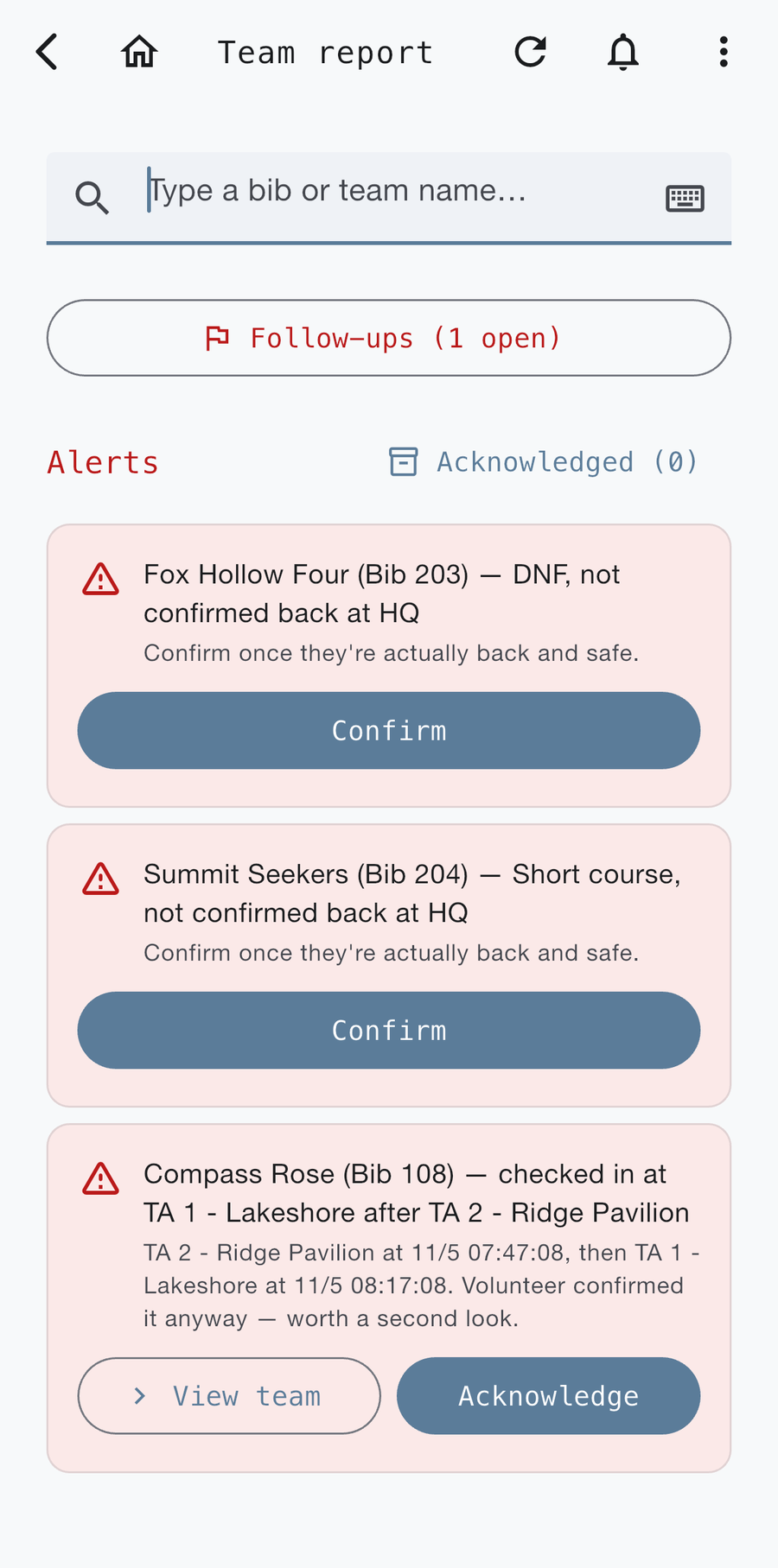
Alerts collect in one list for the race director. Each one says which team, what happened, and what to do next, with buttons to confirm or acknowledge it once you’ve looked.
Missed cut-off
A team misses a cut-off time you set. The alert goes to the race director to review and act on.
DNF or short course, not confirmed back
When a team is recorded as DNF or on a short course, its alert stays open until you confirm they’re actually back at HQ and safe.
Out-of-order check-in
A check-in that doesn’t fit the course order, such as a team arriving at TA 1 after TA 2, is flagged for a second look even when a volunteer confirmed it. Open the team, review the history, then acknowledge.
Flagged by a volunteer or HQ
Anyone running a TA or race HQ can flag a team that needs attention and add a note on why.
How the sport approaches overdue teams
Race safety is a plan, not a feature. A few practices show up again and again in race-operations guidance:
- Define “overdue” before the race. A team that hasn’t checked in within a set window gets flagged. Pace varies, so the same delay means something different for a front-runner than for a team at the back of the pack.
- Match the response to the situation. A missed check-in might start with a call or message. A team that stops moving in a high-risk section calls for a field response. A distress signal means immediate escalation.
- Verify before you act. Check an alert against checkpoint records, weather, direct contact, and field reports.
- Know who decides. Write down who can pause, reroute, or stop the race, so the race director isn’t the only person who knows the chain of command.
- Plan for missing data. Decide what you’ll do when a team stops reporting before it happens.
Those points follow race-operations guidance such as the event safety guide and race operations guide from AdventureEnablers. USARA-sanctioned race directors also agree to follow USARA’s Safety-Aware Event Planning Playbook and to report notable incidents and near misses (USARA sanctioning). Checkpoint’s cut-off alerts, team flags, and live team locations are built to support that plan, not replace it.
Reach the right people fast
- Contact the race director: volunteers see names, roles, and tap-to-call or email details in the app.
- Race Messages: one shared feed for everyone staffing the race. Messages from the RD carry an “RD” tag, and an unread indicator shows when there’s something new.
- Open the TA in Maps: when you’ve set a location for a TA, volunteers and responders can navigate straight to it.
- Race documents: course overview PDFs, if you’ve uploaded one, are one tap away.
If a team is overdue: a checklist for race HQ
- Check the roster and flags. Find the team’s last check-out, where it was, and any flag or note logged against the team.
- Review the alert. See which cut-off was missed and where the team was last checked out, then decide whether the team is late or just slow.
- Message the next TA. Ask volunteers there, in Race Messages, whether the team has been seen. Ask the previous TA about anything not yet logged.
- Contact the team. Use the contact details from registration and the race passport.
- Escalate. If you can’t confirm they’re safe, follow your emergency plan. For a serious emergency, call 911 first, then notify the race director.
Included with Race Ops
Race Ops is free for race directors through 2026. Starting in 2027, a $50/year subscription covers full access to the Race Ops platform for every race you direct. See everything in Race Day Ops.
Related guides and downloads
Know where every team is
Race Ops is free for race directors through 2026. Tell us about your race and we’ll help you get set up.
Email usSee Race Day Ops →